Using the command-line interface
This tutorial is for users who have never used a command-line interface, or have little experience with using a terminal (a.k.a. "command line"). If you are comfortable with command line interfaces in general, head over to the CLI reference.
1. Opening a terminal
To run commands, you first need a terminal window (sometimes called a "command prompt" in Windows, because it prompts you to enter a command). There are many ways to do this, but we will discuss just one. (Read here for more ways to do this.)
- Open the folder where you want to run the command prompt.
-
Press
Ctrl + Lto edit the location bar at the top of the window.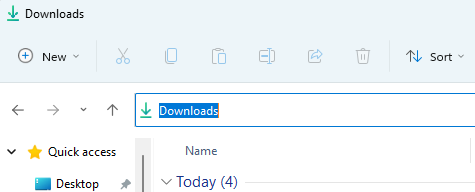
-
Type
cmdand hitEnter.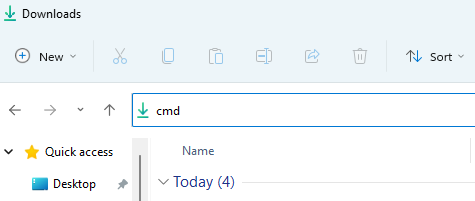
This opens the Command Prompt with this folder as the working directory.
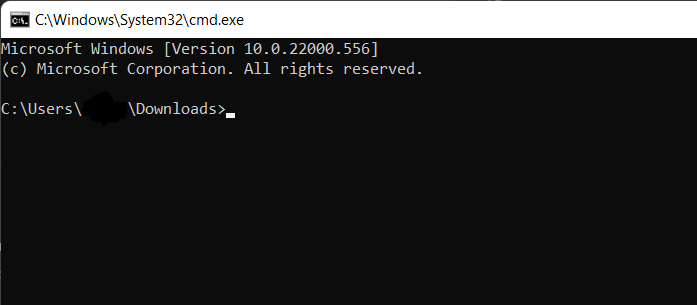
2. Exploring the available commands
-
Type
autory --helpand hitEnter.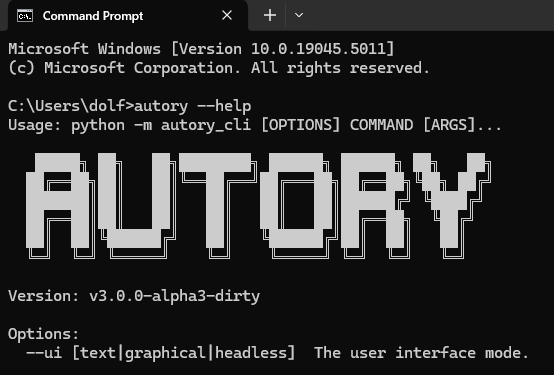
Congratulations! You have successfully opened the Command Prompt and run your first command.
Almost all commands have a
--helpoption. For theautorycommand, the output of--helpis also available here. -
Type
autory new --helpand hitEnter. You will see the documentation for theautory newcommand.